
The Oracle NUMBER Trap: How One Data Type Decision Quietly Slows Down Your PostgreSQL Migration

Every database migration has a story. And after enough Oracle and SQL Server projects landing on PostgreSQL, one pattern keeps repeating: the things that sink a migration are rarely the big, obvious ones.
They're the small, quiet decisions made early - the ones that look harmless in a test environment and only reveal their real cost once the system is live and under load.
Here's the most underrated one of all that we also presented in pgmumbai meetup at Google with our customer C MARC.
The Decision Hiding in Plain Sight
Open almost any reasonably old Oracle schema and you'll find columns declared simply as NUMBER - no precision, no scale. It was the catch-all Oracle developers reached for by default, used for everything from primary keys to flags to amounts.
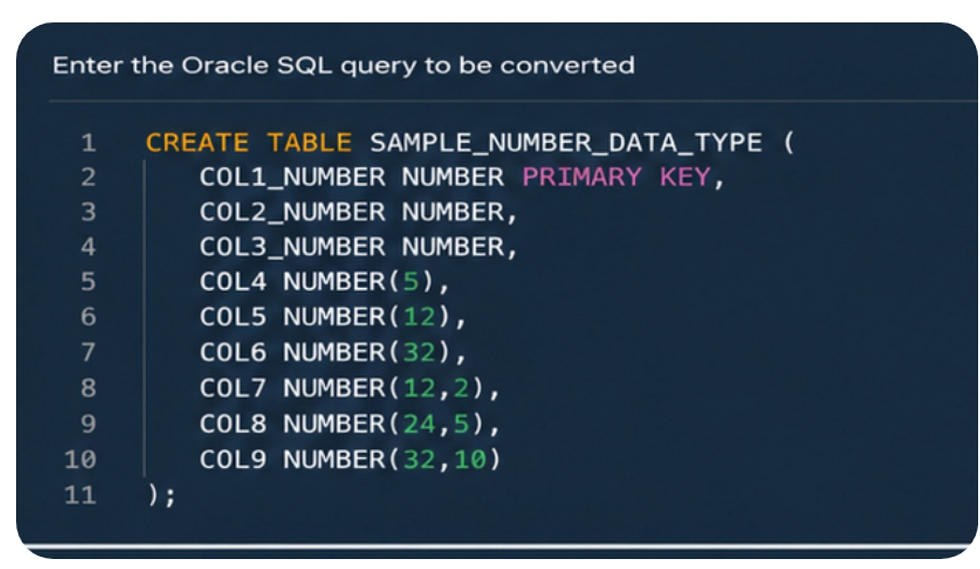
That convenience becomes a problem the moment you migrate.
PostgreSQL has no equivalent catch-all, and NUMBER cannot be mapped to one fixed type across the board. Every column has to be examined individually:
- What does it actually store?
- Is it a primary key or a foreign key?
- How is it used downstream - in joins, in function parameters, in casts?
Only then can you decide whether it should become a SMALLINT, INTEGER,BIGINT, or NUMERIC. There's no shortcut. It's a column-by-column decision, not a global find-and-replace.
The Mistake Almost Everyone Makes
Faced with thousands of NUMBER columns, the path of least resistance is to let a conversion tool map every single one of them to PostgreSQL's NUMERIC - including primary keys.
If your conversion tool does that blindly turning every NUMBER into NUMERIC without exception treat it as a red flag from day one.
It doesn't throw an error. It doesn't fail a test. The schema looks perfectly valid. But that one default compounds quietly, in ways that are painful to unwind once data and applications already depend on it.
The rule is actually simple:
> Whole number? → SMALLINT / INTEGER / BIGINT, sized to how large it can realistically grow.
> Has a decimal point? → NUMERIC.
NUMERIC is attractive because it sidesteps precision loss and overflow - it can represent exact decimals of almost any size. But that safety isn't free. It's also the most expensive of these types in storage and query performance. It's the right tool for money and exact decimals - not a default for every numeric column you're unsure about.
The Impact: Why This Costs You for the Rest of the Project
This is the part teams underestimate, so let me be concrete about where the cost actually shows up.
1. Every query pays a tax
Run the same query - a simple MIN() over one million rows - changing nothing but the column's data type. The result is consistent: the right type roughly halves the query time. Same data, same query, same machine. The only difference is NUMERIC versus INTEGER / BIGINT.
At small scale, a few milliseconds doesn't sound worth worrying about. But that single query in isolation is the best case, not the real one. Production databases run joins across many tables, over millions of rows, with hundreds of queries firing at once. A small, consistent tax on every query becomes a very real bottleneck once it's multiplied across an entire workload.
2. Mismatched join columns silently kill your indexes
This is the trap that's easiest to fall into, because nothing about it looks broken.
Picture two related tables: customers, where customer_id is a clean BIGINT, and orders, where the same customer_id ended up as NUMERIC. Both represent exactly the same thing. There's even an index on orders.customer_id.
Nothing fails. Every order still matches the right customer. The query returns the correct answer and runs twice as slow as it should.
Why? The moment you join those tables, PostgreSQL has to convert one type to the other before it can compare them, on every single row. And because the types don't match, the planner may ignore the index on orders.customer_id entirely and fall back to a full table scan. You paid to build and maintain that index, and you get none of the benefit.
On a small table, this is invisible. On a production table with millions of rows, it quietly erodes performance until someone finally asks why the database feels slow — and the answer turns out to be a single column definition, written once, months ago.
The fix is conceptually trivial: columns that join together must carry the exact same type. BIGINT to BIGINT. NUMERIC to NUMERIC. A primary key and every foreign key pointing to it should speak the same language — not "close enough," but exact.
We learned this the hard way. Early on, while our conversion strategy was still taking shape, a NUMBER primary key landed as NUMERIC. The planner silently stopped using the index. A sequential scan ran undetected for weeks invisible until query times spiked under real load. No errors. No warnings. Just a quietly degrading system. That accident is exactly what hardened the way we map types today.

The Real Problem Isn't Knowing the Rule - It's Finding Every Violation
Here's the uncomfortable truth: the rule is easy. Applying it across a large, real-world schema is not.
The damage doesn't live only in your table definitions. It hides in hundreds of views, functions, packages, and join predicates - wherever a parameter is compared to a column, wherever a cast was added to make something "work." You cannot eyeball thousands of objects and reliably find every place a type decision went wrong.
And because none of it errors, none of it fails a test, and the schema looks valid - it ships. Then it slowly degrades in production, one slow query at a time.
This is why uncovering matters more than converting. A converted schema that compiles tells you nothing about whether it will perform. The performance debt is invisible by design.
How we Fix It with DCGMigrator and you can adapt in your migrations.
We treat this as two distinct jobs: uncover everything first, then fix it deterministically.
Extending the Type Engine Across Code and Views
Resolving every NUMBER to the right PostgreSQL type in the table definitions is the part DCGMigrator already settles automatically - that rule engine is proven and runs on every migration. The harder, more valuable job is making sure the rest of the schema agrees with those decisions.

So the same engine runs a systematic audit across the converted code - views, functions, packages, and join predicates before anything reaches production, and flags:
- Join type mismatches — any two columns that join but don't share a type, not just primary and foreign keys: the BIGINT -against- NUMERIC mismatch that silently disables an index is simply the most common case
- Implicit, index-killing conversions - the casts PostgreSQL injects at runtime to reconcile those mismatched types
- Inconsistent cast patterns across the codebase
- Parameter-to-column mismatches inside function and procedure bodies
The report doesn't just dump findings it ranks them. A hotspot view surfaces the columns responsible for the most mismatches, so you see systemic schema-design issues, not just a flat list of line numbers. You get evidence, not guesswork.
#The Fixer
Finding the problems is half the value. DCGMigrator also applies the fixes - automatically, with no separate remediation sprint.
The fixer is deliberate about how it rewrites. When a parameter is compared to a column, it casts the parameter side to the column's type for example:
WHERE t.customer_id = p_cust_id → WHERE t.customer_id = p_cust_id::int4The column stays bare, so the index stays usable. Function signatures are never touched. The rewrites are deterministic and idempotent: sites already cast correctly are left alone, and edits are confined to function bodies - nothing global, nothing speculative.
One Rule Engine, Applied Everywhere
Underneath all of it is a single precision-driven rule engine - the one that already resolves every type in the DDL by precision and context, column by column:
NUMBER(3,0) → SMALLINT
NUMBER(6,0) → INTEGER
NUMBER(p,0) → BIGINT(If approve for p > 18 as well)
VARCHAR2 → TEXT
DATE → TIMESTAMP
flag columns → BOOLEAN
The shift is that the same rules now follow those columns out of the table definitions and into every place the code and views reference them -so any two columns that meet in a join stay in lockstep, not just the primary and foreign keys, and not just where they're declared.

The Bigger Point: Converted Output Is Not Production Code
This is the mindset shift I'd leave you with.
A tool that "converts" your Oracle schema to PostgreSQL has done the easy part. The output compiles. The objects deploy. The tests pass. And it is still not production-ready - because compiling was never the bar. Performing correctly under real load is.
Converted output is a draft. Production code is what's left after you've uncovered the invisible problems and fixed them with evidence that they're gone. "Zero issues on the audit" means genuinely production-ready — not "it compiled."
The Oracle NUMBER trap is just one problem class. It's one of dozens DCGMigrator audits and remediates automatically on every migration alongside DDL conversion, constraint and index fidelity, trigger rewrites, and sequence alignment. The goal across all of them is the same: remove the problem class entirely, so it can't come back as part of testing phase or incident six months from now.
Get the types right once, with proof or spend the time finding them one slow query at a time.

Very well articulated and explained with clear example. Thought things seems small but can have big impact specially on Prod. We too faced similar issue during OraToPg conversation.